
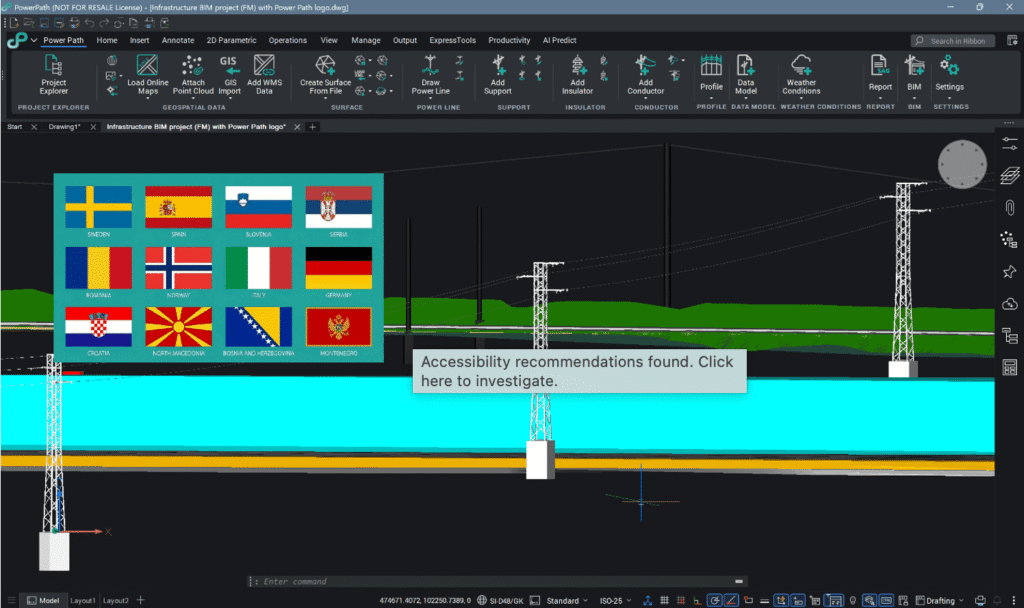
An update of the Power Path solution for power line design has been released. This blog post outlines the new and updated features introduced in updated version V25.
The POWER PATH team is constantly developing and improving the Power Path® solution. Behind the scenes, our development and support teams work daily to create, improve and research new functionalities, providing customers with new and innovative approaches to power line design. In front of you is What is new document which describes what the latest version brings.
The latest version of the Power Path solution is Power Path V25, build 25.2.08.

Power Path offers numerous benefits for power line design and project development, including:
- 2D design and advanced 3D BIM modeling
- Generation of calculation reports
- Customization of power line components
- Reduction of information-sharing restrictions
- Increased project transparency
- Enhanced project visualization
- Import/export of IFC (BIM) models
- Import/export of GIS data
- Integration of online maps and WMS data
- Seamless project sharing with all data for the next phases (construction, operation, maintenance and management)
Power Path solution is not just limited on power line design process, it is a powerful CAD and BIM solution for 2D drafting and 3D BIM modeling in AEC (Architecture, Engineering and Construction) industry.
Enjoy in exploring and using new functionalities!
🔧 Upgraded and/or Extended Existing Commands and Functionalities for Power Line Design
• [PP_SETTINGS] – The solution now includes full support for selecting and switching between multiple technical standards (guidelines, manuals, and/or codes). Users can choose among the following standards: Croatian, General, German, Italian, Norwegian, Romanian, Serbian, Slovenian, Spanish and Swedish. When running the software for the first time, it is recommended that the user select the standard under the General tab, which will be applied to the project. In addition to the standards, this command also includes new and expanded existing units of measurement under the Unit tab.
• [PP_ADDWEATHERCONDITIONS] and [PP_EDITWEATHERCONDITIONS] – The dialogs are now adapted and expanded as needed, depending on the parameters required for calculations based on the selected standard. The visual layout of the dialogs may vary from one standard to another.
• [PP_CREATESAGTENSIONREPORT], [PP_CREATEQUANTITYREPORT] and [PP_CREATESUPPORTREPORT] – Added Slovak language for generating reports. Language selection drop‑down now sorted alphabetically.
• [PP_ADDCONDUCTORDATA] – Enhanced command for adding or duplicating conductor data. Previously, if the user wanted higher precision when entering parameters, they had to manually adjust the number of decimal places in PP_SETTINGS. Now, the default precision is set to four decimal places (0.0000).
• [PP_ADDPROPERTYSETS] – Added the attribute Conductor Length to the conductor property definitions. The BIM model of conductors now contains length information for each catenary. Also, enhanced command with the ability to change units of values for created attributes in property sets. Units can be defined in PP_SETTINGS.
• [PP_IFCEXPORT] – Upgraded IFC file export to support the required structure and records in alignment with buildingSMART IFC Validation, a service provided by buildingSMART International.
• Support Data Models – Added new support data models. New steel lattice supports have been added to the library of support models.
🛠️ Fixed Existing Commands and Functionalities for Power Line Design
• [PP_ADDWEATHERCONDITIONS] and [PP_EDITWEATHERCONDITIONS] – Updated Croatian, Slovenian, and Serbian standards. When the user enters a positive value for the user‑defined temperature, the input option for ice load is enabled, but the option for including ice‑load occurrences is disabled. When a negative value is entered, the input option for ice load is enabled, and the user can also choose to include or exclude ice‑load occurrences.
• [PP_CREATESUPPORTREPORT] – Fixed missing reduced forces and moments in the .txt file report, and improved character encoding for Croatian, Slovenian, and Serbian languages.
• [PP_CREATEQUANTITYREPORT] – Fixed translations in the Quantity report. The length summary section in the .txt file is now displayed in the selected language instead of always being shown in English.
• Support Data Models – Fixed attachment points support data models. For some existing supports with incorrectly defined attachment points, the attachment points have now been corrected and updated.
➕ Added Other New Commands and Functionalities
• [ATTACHCIVILOBJECT] – This command attaches a surface from an external drawing that contains surface object(s). Using this command, the user can decrease the .dwg file size and increase performance when working on projects with large surfaces.
• [LANDXMLEXPORT] – This command records and exports surface objects to LandXML (.xml) files for sharing with other solutions.• [LEICACONVERT] – This command imports and/or converts Leica Infinity and native CAD entities into the opened drawing.
🔁 Upgraded and/or Extended Other Existing Commands and Functionalities
• [GISIMPORT] – Renamed and enhanced the former “SHP Import” command to support multiple geospatial formats. The command now imports .shp, .kmz, .kml, and Geodatabase files.
• [GISEXPORT] – Renamed and enhanced the former “SHP Export” command to export objects with attributes to .shp, .kmz, and .kml files.
• [GEOMAP] – The service for importing Bing Maps was discontinued in June 2025. The command now supports inserting maps from Esri Maps or using OpenStreetMap services.
• [GEOGRAPHICLOCATION] – Upgraded geographic location base systems with new definitions, providing users with more coordinate systems.
🧱 Fixed Other Existing Command and Functionalities
• Power Path custom objects will, starting from this version, be identified simply as Power Path objects without a version label. When using Power Path .dwg files in another CAD/BIM solution, the objects will also be identified only as Power Path objects.
📚Learn More
Watch the full video presentation on our YouTube channel. The presentation is available in different languages:🎬Power Line Design Software – What’s New in the Updated Power Path V25 (Multi-Standard, BIM, GIS) https://youtu.be/0sWiI9eL-xM
Find a detailed technical overview in our POWER PATH SUPPORT PORTAL:
📄 https://powerpath.freshdesk.com/support/solutions/articles/101000575768-power-path-v25-updated-february-2026-what-is-new-
🎯 Try Power Path® V25
If you’re ready to start designing power line projects using a BIM-based approach, simply import your data and use Power Path for all your 2D drafting and 3D modeling needs in engineering workflows.
To download and try Power Path V25 with a 30-day free trial, just fill out the form to request your trial.
👉 Start your free trial here: https://power-path.com/trialrequest/ .